Why is Python slow
Since Python is a high-level dynamic language, its code is compiled when it is running, and a lot of complicated work is done during the compilation process. For example, Python's syntax greatly simplifies variable declarations, and it does not require specifying the types of the variables, so the interpreter needs to infer at runtime, which will take more time.
In short, the reason why python makes it easy for you to write is because it does a lot of work behind the scenes.
Besides using a low-level language, is there anything I can try first?
When you find that you use a for loop and the number of iterations is large, you will start to think, can this process be replaced by matrix operations?
Python beginners or linear algebra beginners may not know much about matrices. To put it bluntly, it is actually arranging numbers into a square matrix, and then performing operations in the same way at the same time, and these operations have a lot of fancy names, which is linear algebra. category. But here, no knowledge of linear algebra is required. Numpy is a very powerful Python package that can help you implement matrix operations quickly. The reason why it is fast is that it has done a lot of optimizations in the C language at the bottom, the most important of which is that it can perform parallel computing and give full play to the performance of the machine, while the for loop we directly use in Python is serial, and also It is to wait for the previous calculation to complete before starting the next one. When the amount of data is huge, this speed is simply catastrophic.
Of course, not all loop logic can be replaced by matrix operations. For example, when using a for loop to request different APIs, the loop logic contains operations other than numerical calculations, so it cannot be replaced by matrix operations. However, if you can abstract a loop of pure numerical computation, like in this example, if you can make the API return all the data at once, then you can write the data into a matrix, and you can use matrix operations to process the data in parallel.
An example: displaying 4D data with a 3D coordinate system
I used to be very interested in four-dimensional space. Mathematically, four-dimensional space does exist, but I know that we can't directly display four-dimensional objects in three-dimensional space, so I thought, at least we can think of something, just Representing data so that we can better understand the existence of four-dimensional space. A good approach is to use gradient colors to represent the data in the fourth dimension in a 3D image.
First look at the for loop method
import pandas as pd
def oscillate_range(stop):
"""
range but generate in this way:
0, -1, 1, -2, 2, -3, 3, ..., -stop/2, stop/2
note:
Since we dug out a four-dimensional sphere from a four-dimensional cube by determining the distance between the data points and the center of the sphere,
we can start from the center instead of the side to avoid redundant calculations in the corners of the 4D cube.
"""
a, counter = 0, 0
while True:
if counter > stop:
return
yield a
if a == 0:
a -= 1
elif a < 0:
a = -a
else:
a = -a
a -= 1
counter += 1
def forloop_process():
# Data structure for drawing
df4d = pd.DataFrame({'x': [],
'y': [],
'z': [],
'w': []})
# Generate a solid sphere of radius 10, with r values from 0 to 10
for r in range(11):
# The center of the circle is (0, 0, 0, 0)
# generate x coordinates
for x in oscillate_range(20):
# generate y coordinates
for y in oscillate_range(20):
# Determine if it is inside the sphere
if x**2 + y**2 > r**2:
continue
# generate z coordinate
for z in oscillate_range(20):
# Determine if it is inside the sphere
if x**2 + y**2 + z**2 > r**2:
continue
# Generate w coordinates
for w in oscillate_range(20):
# Determine if it is inside the sphere
r_calculated_2 = x**2 + y**2 + z**2 + w**2
if not r_calculated_2 <= r ** 2: # not in the sphere
break
else: # inside the sphere
data = {'x': x,
'y': y,
'z': z,
'w': w}
# Add data to the structure for drawing
df4d = pd.concat([df4d, pd.DataFrame(data, index=[0])])
As you can see, I even wrote a generator oscillate_range to optimize this process, trying to reduce some redundant loops. I am using the tqdm module to display a progress bar for the outermost loop.
for r in tqdm(range(11)):


As you can see, the first few loops are not fast but acceptable, but towards the end of the loop, the speed is suffocating. This is actually because under the same sampling accuracy, the smaller the radius, the fewer data points in the sphere. On the contrary, the larger the radius, the more data points in the sphere, and the longer the operation time. Looking back, when I first ran this code, I just created a sphere, and I didn't finish running it when I went to the large toilet. This is the first time that the performance of python has really affected my mood. So I think there must be a better way to achieve it, so I have the following story.
def matrix_process():
# Create a one-dimensional length matrix for each dimension
X = np.arange(-10, 10)
Y = np.arange(-10, 10)
Z = np.arange(-10, 10)
# Change the position of the center of the sphere in the fourth dimension since the color cannot display multiple values on the same data point
W = np.arange(0, 20)
# Use the very intimate meshgrid function prepared by numpy to generate a four-dimensional grid matrix corresponding to each dimension
# This step is actually the most difficult part to understand at the beginning. This is equivalent to tiling each one-dimensional length in the direction of the other three dimensions, so it can ensure that when the four four-dimensional matrices x, y, z, and w are put together, it is just right to form the coordinates of all the data points.
x, y, z, w = np.meshgrid(X, Y, Z, W)
# Calculate the distance of each coordinate point from the origin at the same time, and the benefit of parallel computing starts to present.
r = np. sqrt((x - 0) ** 2 + (y - 0) ** 2 + (z - 0) ** 2 + (w - 10) ** 2)
# Find the data points inside the sphere and store their coordinates in the drawing dataset
r_idx = np.where(r <= 10)
df4d = pd.DataFrame({'x': X[r_idx[0]],
'y': Y[r_idx[1]],
'z': Z[r_idx[2]],
'w': W[r_idx[3]]})
Test the running time with the timeit module
print(timeit.timeit(stmt=matrix_process, number=1))
# out: 0.004268000018782914
It can be seen that only one meshgrid function completes all the work of the above nested for loops. Moreover, the speed of parallel operation is significantly faster, and there is no need to care about redundant calculations at all.
Summary
Although the matrix version of the code looks simpler, the meshgrid function does a lot of work behind the scenes, which is far more complicated than the simple and intuitive nested loop logic I wrote.
In addition, I believe that many Python beginners must have heard about the slow speed of Python, so when they started writing code, they were worried about how to optimize and speed up, but in fact, only when you experience the pain once, you start to become hungry to find a solution, and you will naturally find the right direction for optimization. Now that you have chosen Python, you only need to grasp the first principle of writing code that is "if it runs, just relax."
The Forgotten 4D Sphere
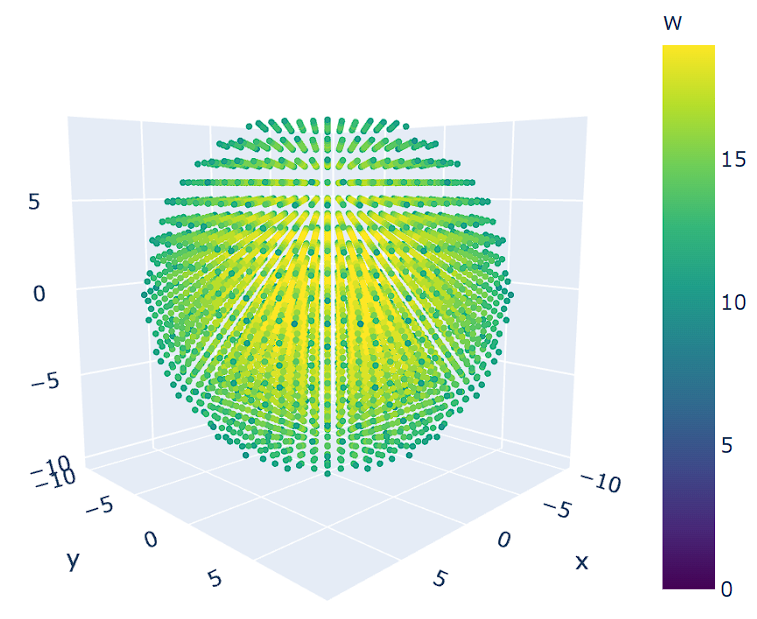
This is not a real 4D sphere, just a 3D sphere with a color scale to mark the distance from the position of the data point in the fourth dimension to the center of the sphere. It can also be said that this three-dimensional sphere is the projection of the four-dimensional sphere in our three-dimensional space. It can be seen from the figure that the closer to the center of the sphere, the larger the value of the fourth dimension. Therefore, it is reasonable to imagine that when a four-dimensional sphere is uniformly squeezed into our three-dimensional space, assuming that the extrusion does not cause the three-dimensional sphere to deform, the sphere will become denser from the center. Then if it eventually deforms, in three dimensions, the matter will expand outward from the center of the sphere. In the words of "The Three-Body Problem", just as the "dual-vector foil" makes the three-dimensional space fall to the two-dimensional space, the two-dimensional space will spread around the plane. Our "triple-vector brick" can make the four-dimensional space fall into the three-dimensional space, and the matter will spread in every direction. By the way, just like the description of the four-dimensional space in the "The Three-Body Problem", from the perspective of the four-dimensional, all the structures are unfolded. Inside our three-dimensional sphere model, many substances in the fourth dimension appear in our three-dimensional space just like they come out from nothing, which leads to the expansion of our sphere.
第一