
Speaking is usually much faster than typing. Voice input tools like Typeless and Wispr Flow do this well: press a key, speak, and the text appears at your cursor, cleaned up along the way. But they are paid subscription products, and your voice is processed on their servers.
So I made Aoide: an open-source voice input tool for Windows and macOS. Your speech is recognized on your own computer, with no account and no cloud service involved. If you want the text polished, you can plug in an LLM of your choice.
Aoide is the Muse of song and voice in Greek mythology.
What it does
Day to day it is a single key: tap Right Alt (Right Option on macOS) to start speaking, tap it again to stop, and the text goes into whatever input box has focus. Changed your mind halfway? Press Esc.
On top of that, it can do this:
| Feature | How | Result |
|---|---|---|
| Dictation | Tap Right Alt → speak → tap again |
Transcribed, polished, typed into the focused input box |
| Voice edit | Select some text → hold Right Alt and press Space → say how to change it |
An LLM rewrites the selected text as you said and replaces it |
| Voice translation | Hold Right Alt and press T → speak |
Speak Chinese, get English (or any language you set) |
A few details worth mentioning:
- It tidies up, it doesn't make things up. Polishing removes the "um", "uh" and "like", and joins broken phrases into full sentences. Say a few points and you get a numbered list; a one-line message stays one line. Nothing you didn't say is added.
- Inserting into the middle of text reads naturally. When the cursor sits inside existing text, Aoide looks at what comes before and after and writes only the part that belongs at the cursor, matching the language and punctuation around it. The existing text is never touched.
- It learns your words. Names, product names and jargon keep coming out wrong? Fix them once in the input box. Aoide compares your edit with what it typed, checks that the two sound alike (so rewording isn't mistaken for a recognition error), adds the correction to its vocabulary and fixes it from then on.
- Nowhere to type? Nothing is lost. When no input box has focus, the result shows on a card at the bottom of the screen, ready to copy.
- You always know what it's doing. A floating bar at the bottom of the screen shows each stage (recording, transcribing, polishing), and starting, stopping and cancelling each have their own sound.

Your voice stays on your computer
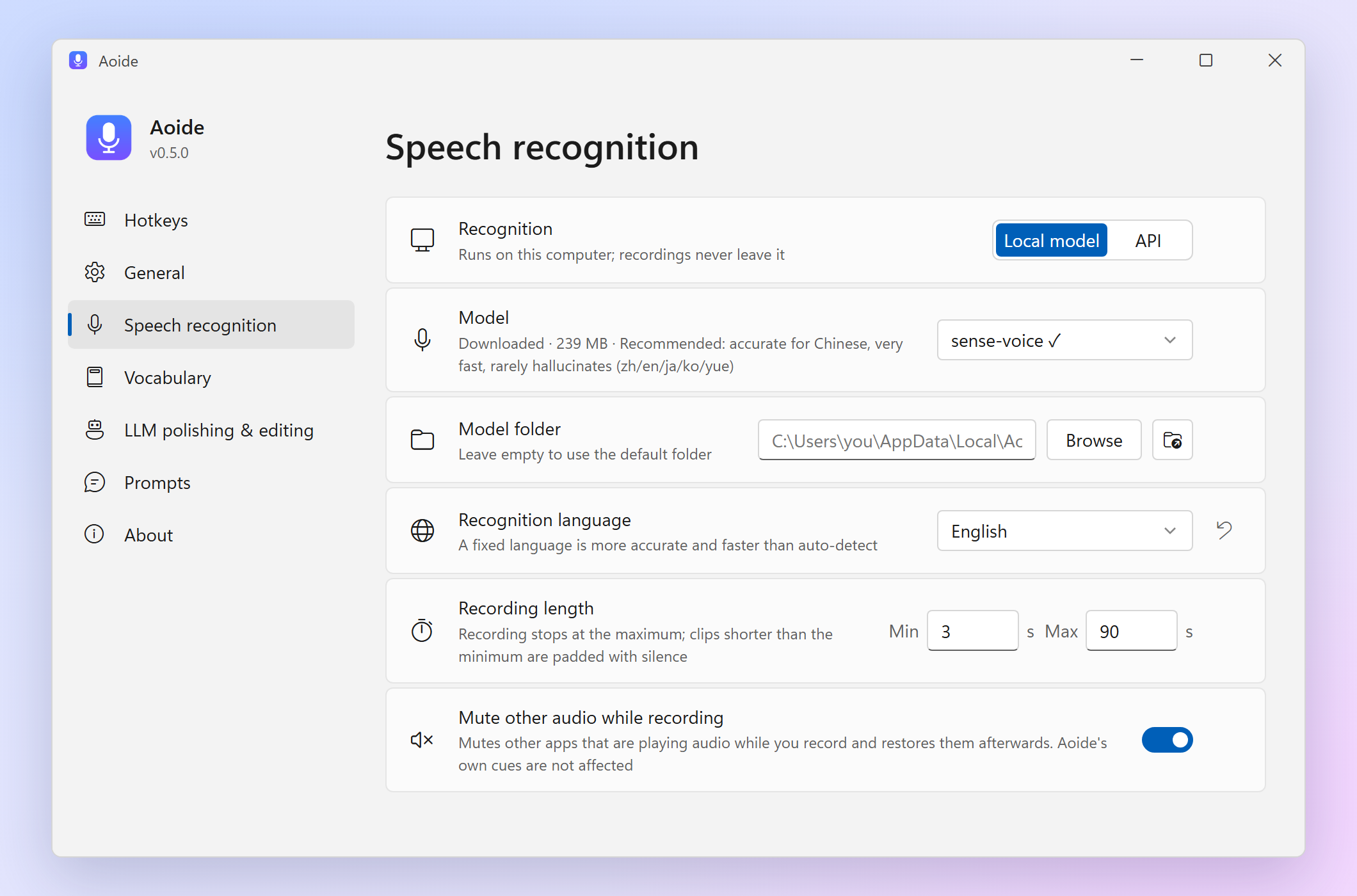
Recognition runs locally by default, with two engines to choose from:
- SenseVoice (the default): fast on any CPU, accurate for Chinese, and it almost never "hallucinates" words you didn't say. Supports Chinese, English, Japanese, Korean and Cantonese.
- Whisper: runs on the graphics card through Vulkan (NVIDIA, AMD and Intel alike, no CUDA needed), or Metal on Apple silicon Macs, and falls back to the CPU when there is no usable GPU.
If you'd rather recognize speech in the cloud, you can enter any OpenAI-compatible speech recognition API (OpenAI, Groq, SiliconFlow, your own server…). Even then, Aoide trims the silence locally first, and recordings with no speech are never uploaded.
The LLM used for polishing, editing and translating is likewise any OpenAI-compatible API, local or remote. Aoide works without one too; you just get the raw transcription.
Five days, 62 commits
Aoide is vibe coded: from the first commit on October 20 to the v0.5.7 release on October 24, it took five days, 62 commits and 19 releases, and every single commit was written together with the AI coding assistant Claude (in Claude Code).
Roughly how it went:
- Day 1: the first working version (recognition + polishing + typing the text in); that evening, "learns your words" and automatic updates.
- Day 2: the macOS version, default hotkeys for Japanese keyboards, a Japanese interface and Japanese docs.
- Day 3: the project's home page; typing straight into web pages in Chrome and Firefox on macOS; cloud speech recognition APIs; voice translation in the evening.
- Days 4 and 5: a size limit for the vocabulary, a smoother macOS permission flow, and a long list of interface details.
The result is a Tauri 2 app: about ten thousand lines of Rust on the back end, with the settings window in plain HTML, CSS and JavaScript. Everything that talks to the operating system (the keyboard hook, simulated key presses, finding the focused control, muting other apps, the floating bar window, the sounds) is written once for Windows and once for macOS behind the same interface; the rest is shared. sherpa-onnx, which runs the recognition, is built from source without its text-to-speech module, so the app contains no GPL code and the whole project can be MIT-licensed.
What I did over those five days was mostly deciding what I wanted, using it every day, and asking for changes wherever it felt off; the AI wrote most of the code. One person building a cross-platform desktop app in their spare time, in a few days, would hardly have been possible before.
Getting started
Windows (Windows 10/11 x64)
- Download
Aoide_x.y.z_x64-setup.exefrom GitHub Releases and run it; no administrator rights needed. - On first launch the settings window opens: click Download to get the default speech model (239 MB).
- Tap
Right Altin any input box and start speaking.
macOS (macOS 11 or later, Apple silicon or Intel)
- Download the
.dmgfor your chip and drag Aoide into Applications. - Aoide isn't notarized by Apple, so macOS blocks it the first time: go to System Settings → Privacy & Security and click Open Anyway.
- Grant microphone and Accessibility access as the settings window asks, download a model, then tap
Right Optionto start speaking.
For polishing, editing and translating, enter your LLM's API address, key and model name in Settings. "Disable thinking", on by default, makes reasoning models skip their thinking step, which makes responses noticeably faster.
Finally
Aoide is fully open source (MIT), its interface comes in Chinese, English and Japanese, and it checks for updates once a day and installs them with one click.
- Home page: parad1se98.github.io/aoide
- Source code and downloads: github.com/PaRaD1SE98/aoide
If you run into a problem or would like a feature, open an issue on GitHub or leave a comment below.